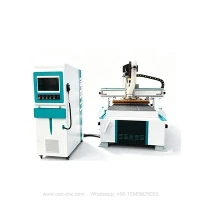
The core principle of using a woodworking engraving machine is "software first, machine second," with a focus on tool setting and safety precautions. Different materials require different tools. This article mainly tells how to use a cnc router.
1
How to prepare before starting work?
- # Environment Check: The cnc wood router must be grounded, and it should be kept away from strong electrical and magnetic fields. If the voltage is unstable, a voltage regulator must be used. Water-cooled spindles must be circulated with water beforehand.
- # Material Fixation: Sheet metal must be clamped securely with clamping plates to prevent movement during processing. Cutting tools must be firmly mounted and kept sharp.
- # Safety Precautions: Wear safety goggles while operating the machine. Gloves are strictly prohibited. Long hair must be covered with a cap. The computer must not be in sleep mode.
2
How do the computer andcnc Router work together?
- # Software Drawing: Design the pattern on the computer using drawing software (such as JDPaint or Artcam) to generate an engraving path file (G-code or NC file).
- # Machine Operation: After powering on, first return to the machine origin, load the file from the computer, and manually move the cutter head to the material corner point to set the workpiece origin.
- # Start Engraving: First, simulate and check the path. Once confirmed to be correct, start the spindle, adjust the speed, and click "Start Processing."
3
How to maintain the router wood cnc after use:
- # Dust removal: Clean the work surface and guide rails daily after finishing work to prevent jamming.
- # Regular lubrication: Lubricate the drive shaft weekly and check for loose screws monthly.
- # Troubleshooting: If the cnc router machine doesn't move, check the connection cables; if the spindle is overheating, check the water pump; if an overtravel alarm sounds, manually move the machine back within the limit.
Please fill the form Below ''Send Inquiry'' for more suggestions.
Or click Top Menu "Contact Us" for more professional advice.